 CamJam
Free app for Android and iPhone
Film it shot by shot. It's already cut to the beat.
CamJam is a free camera app for Android and iPhone for short vertical videos. A recipe tells you what to film and for how long; every shot is edited in the background while you film the next one, so when you press stop your Reel, TikTok or Short is ready — cuts on the beat, smooth fades and music included.
- Android 7.0+ (64-bit) and iPhone with iOS 17+ — the same features on both.
- App in English, Español, Català and Русский.
- No Google Play on your phone? Download the APK (59 MB)
Works offline — in the mountains, underground, on a plane. No cloud, no tracking.
Why short videos take so long — and what CamJam changes
No time. A 30-second Reel takes an hour or two: deciding what to film, filming, picking clips, cutting to the music.
Minutes instead of hours: you film by a ready storyboard, and the edit is done while you film. The video is ready when you press stop.
You film without a plan — 60 clips “just in case” — and at home the footage doesn't add up to a story.
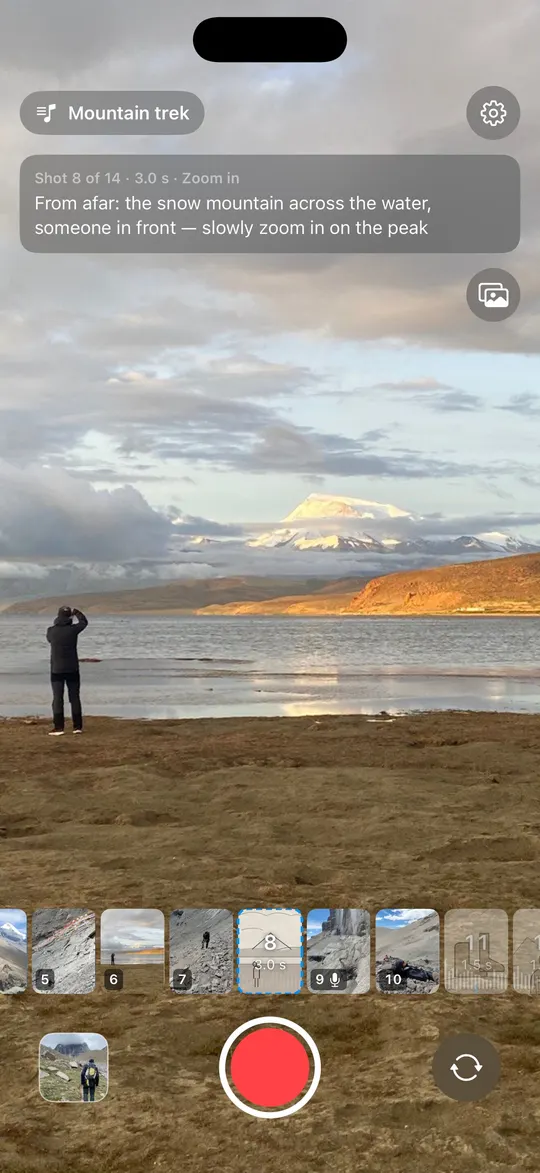
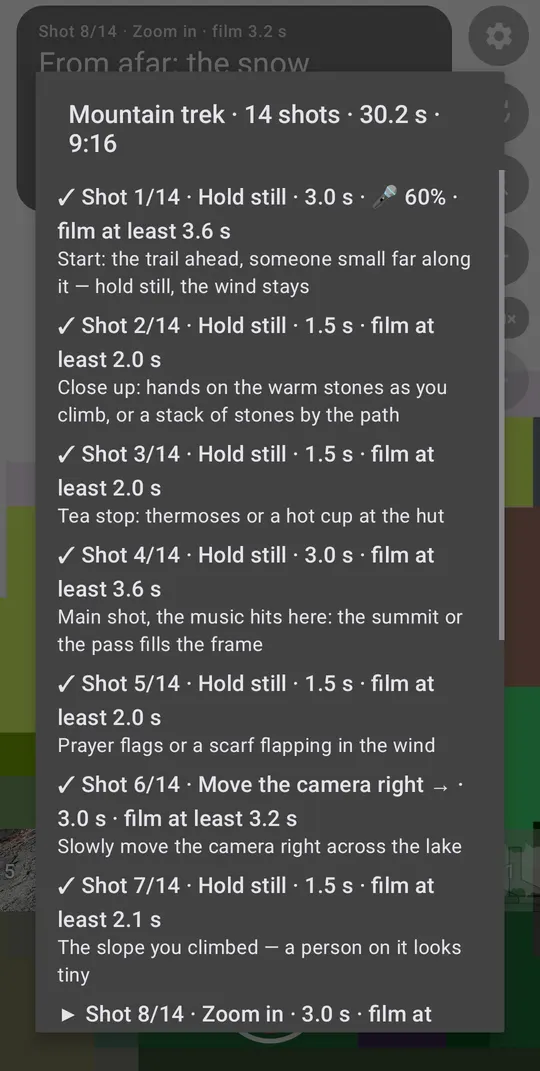
The recipe says what to film before you start: 16 shots, each with an idea and a length. You film only what the video needs.
Cutting to the beat by hand: zoom the timeline, find the beat, nudge the clip, repeat for every cut.
Shot lengths are measured in beats of the track. Every cut lands on a beat automatically — you never touch a timeline.
Templates break when your clip is a different length: the music drifts and you fix every slot by hand.
You film to the template: the camera counts down each shot and records a little extra, so every shot fits its slot exactly.
“What do I even film?” — a blank camera kills the idea.
Every shot has a hint: “a detail up close”, “move the camera along the road”, “the answer to the look”. Recipes are written for trips, walks, food, events, nature.
No signal in the mountains, the metro or on a plane — and the editor wants to log in, load templates or render in the cloud.
CamJam needs no internet at all: filming, beat detection and editing run on the phone — at 3,000 m, underground or in flight mode.
Export, upload, watermark, subscription.
No account, no cloud, no ads, nothing stamped over your shots. The video is processed on your phone and saved to your gallery.
How it works
- Pick a recipe. A recipe is a track plus a storyboard: the shots, their length in beats, how the camera moves (hold still, move sideways, zoom) and how each one joins the next. Use a built-in one, download one from the catalog, or make one from your own song.
- Film by the hints. The camera shows the idea for the next shot and counts down to its length. Tap the previous shot and its last frame shows through the viewfinder — line up the next shot so the motion continues.
- Press stop. Each shot was already cut in the background. Within seconds you watch the finished video: cuts on the beat, smooth fades, music fading in and out, live sound where the recipe asked for it.
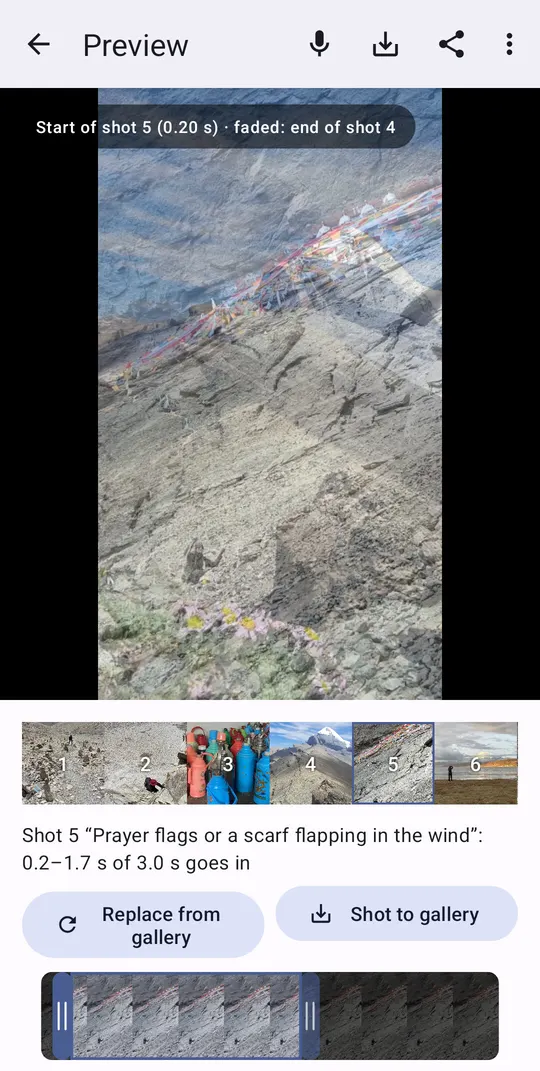
- Fix without reshooting. Slide a shot's window with the trimmer, swap a shot for a clip from your gallery, reorder or delete shots — only the touched shots are re-encoded.
What it looks like
How much time it saves
| Step | By hand in a phone editor | With a CamJam recipe |
|---|---|---|
| Deciding what to film | 10–20 min | 0 — the recipe has the hints |
| Filming | 15–30 min | 10–20 min, only the shots you need |
| Picking and trimming clips | 10–20 min | 0 |
| Cutting to the beat, transitions | 20–40 min | 0 — automatic, frame-accurate |
| Music, fades, live sound | 5–10 min | 0 |
| Total | about 1–2 hours | about 15–25 minutes; ready when you press stop |
Our estimate for a 30-second Reel with 12–16 cuts. Freelance editors typically quote 1–2 hours for a full short-video cycle; a simple 15–30 s edit by an experienced editor takes up to 20 minutes on top of the selection and planning.
What's inside
Cuts on the beat, to the frame
Shot lengths are quantized to video frames cumulatively, so no cut drifts from the beat by more than half a frame — even on the 16th shot.
Your song → a recipe
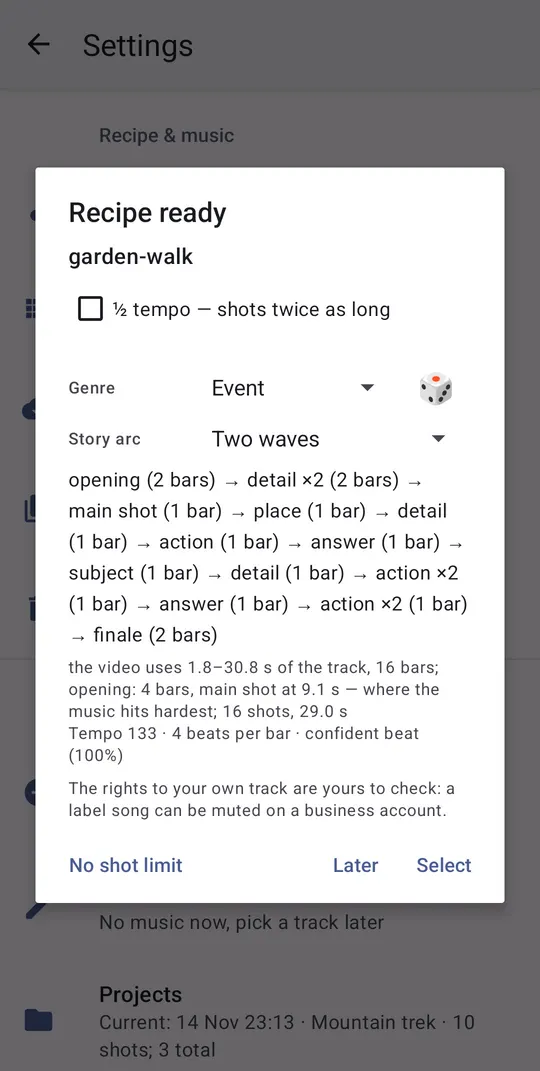
Import a track or the sound of any video. CamJam finds the tempo, bars, sections and the big moment, and puts the main shot right where the music hits.
Continue the motion from shot to shot
The end of the previous shot shows through the viewfinder, so a movement continues across the cut.
Slow motion and shot speed
120 and 240 fps where the phone camera allows it, ×2 almost everywhere. After filming, any shot can be sped up 2×–8× or slowed to ½× or ⅓× — a neural network draws the in-between frames on the phone, so the motion stays smooth.
Your voice over the video
In the preview press “Record from here” and talk or sing over the edit; redo just one piece without touching the rest. The music ducks under your voice; with headphones you hear it while recording.
Zoom, focus and buttons
Hold the shutter and slide up for a smooth push-in, down to pull out; + and − step through the phone's lenses. Tap the viewfinder to focus and meter on that spot, brightness ±2 stops. The volume buttons work as the shutter.
Draft now, music later
The moment is happening and there is no track yet? Film a draft, then re-cut the same footage to any song.
Re-cut to another track
The same shots, a different recipe or song: one tap, a new edit; the original project stays.
Works fully offline
No internet needed to film, analyse a track or edit: in the mountains, in the metro, on a plane. No account, no analytics, no ads; your videos are never uploaded.
Made for
Travel videos
Turn a trip into a 30-second travel Reel while you travel: a storyboard of 16 shots, hints for each, cuts on the beat. Free app for Android and iPhone.
Offline
Make a beat-cut Reel with no signal: in the mountains, the metro or on a plane. CamJam films and edits entirely on the phone — no account, no cloud.
Restaurants & small business
Reel ideas for a bar, restaurant or shop: a recipe says what to film, the video is cut to the beat on the phone in 15 minutes. Free, works offline.
Family & events
A short video of a birthday, a wedding, a school sports day or a match, made while it happens: shot hints on screen, set to music, ready for the family chat.
Your own song
Musicians, DJs, creators: import your track, CamJam finds the tempo, bars and the drop (where the music hits hardest) and writes a storyboard. Film it — every cut lands on the beat.
Recipes for your niche
Haircut in 10 minutes
A barbershop or salon cut from start to finish to a funky new jack swing groove: the empty chair, the tools, clippers and scissors up close, and the before-and-after in the mirror where the music hits.
A day at the café
One day of a café or a bakery to a light jazzy loop: the door in the morning, the first coffee, the barista's hands, pastries, window light, customers, the evening.
Property tour
A home tour for a listing or a holiday rental to a cosy acoustic tune: the facade, the front door, the living room where the music opens up, the kitchen, the bedrooms, the bathroom and the view.
Product ad in 15 seconds
A short ad in the style of creator videos to a funky house beat: a hook in the first two seconds, the problem, your product where the music hits, the result and a call to action.
Morning yoga
A calm morning practice to a soft piano loop at 60 beats a minute: window light on the mat, a pose, breathing, hands, a long stretch and stillness at the end.
Garden walk
A seasonal walk through a garden, an allotment or a country plot to a folk lute tune: the gate, dew on the leaves, the beds where the music hits, a ripe tomato up close, watering, hands full of harvest — and the whole garden at the end.
School show
A school performance or a sports day to a cheerful toy-soldier march: arriving, getting ready, the big moment on stage or on the track where the music hits, cheering parents, applause, medals and hugs.
Best of the trip
The best moments of a trip to a rising, inspiring tune: the suitcase by the door, tickets and the map, the landscape through the window, the best view of the whole trip where the music rises, local food, street life and one last sunset.
Try it on your next walk
Install CamJam, pick “Lazy day at home” — it is designed to be filmed in your own flat in five minutes — and see your first beat-cut video before the coffee gets cold.
- Android 7.0+ (64-bit) and iPhone with iOS 17+ — the same features on both.
- App in English, Español, Català and Русский.
- No Google Play on your phone? Download the APK (59 MB)
Questions and answers
Is CamJam free?
Yes. CamJam is free on Google Play, with no ads, no subscription and nothing stamped over your shots. At the end it can add a 2-second CamJam card — switch it off anytime in Settings → Shooting; if you like the app, leaving it on helps us get found.
Does CamJam work without internet?
Yes, completely. Filming, beat detection, editing and saving work offline — in the mountains, underground or in flight mode. Internet is used only if you choose to download recipes from the catalog.
Which phones does it work on?
Android 7.0 or newer with a 64-bit processor — practically every phone sold since 2017, including inexpensive ones; the app is about 41 MB. Slow motion ×4/×8 needs a camera that gives apps 120/240 fps, such as Pixel and Samsung Galaxy phones. On iPhone: iOS 17 or newer. iPhone with iOS 17: iPhone XS, XR and later, SE from the 2nd generation (2020). Shots are edited in the background no more than two at a time, so even an inexpensive phone keeps filming.
Can I use my own music?
Yes. Import an audio file or share a video to CamJam to use its sound. The app finds the beat and the moment the music hits hardest and writes a storyboard for it. Make sure you have the rights to post the music where you publish.
Will my video be muted on a business account?
Not with recipe music: every recipe track is either CC0 (public domain) or made for CamJam on a paid Suno plan with commercial rights — all of it can go out from a business account, in ads and on any platform, with no attribution. Business accounts on Instagram and TikTok can't use label hits at all, so this is the safe choice for a café, shop or brand. With your own track the rights are yours to check: a label song can be muted or blocked, and a Suno song may be used commercially only if you made it on a paid plan.
Can I use a trending sound from Reels or TikTok?
Yes, two ways. To cut to its beat: save a video with that sound to your phone and share it to CamJam (or pick it as your own track) — the app finds the beat and writes a storyboard. When you post, add the same sound in Instagram or TikTok from its music library, start it at the same moment and turn the video's own sound down: the cuts stay on the beat, and the platform's licence covers the song. Business accounts only get the platform's commercial library.
Is it for Instagram Reels, TikTok or YouTube Shorts?
All three: CamJam makes a standard vertical 9:16 MP4 (or 16:9 if you film in landscape) that you save to the gallery or share straight to any app.
What quality is the finished video?
An MP4 (H.264) at 720×1280 and 30 fps, about 8 Mbit/s, with AAC sound — the usual format for Reels, TikTok and Shorts. A setting switches to 1080×1920.
Which languages is the app in?
English, Spanish, Catalan and Russian, following your phone's language or a setting. Italian, German and Portuguese are not available yet.
How is it different from CapCut templates or Instagram Edits?
Those editors work after the shoot with clips you already have; templates expect clips of exact lengths. CamJam gives you the storyboard before you film and edits during the shoot, so the footage fits the beat by design — and it needs no account and no internet.
Is there an iPhone version?
Yes: CamJam is on the App Store for iPhone (iOS 17 or newer), free, and does the same as on Android: recipes and the catalog, your own track or the sound of a video, the previous shot over the camera, slow motion, zoom on the shutter, voice-over.
Can I make several versions from one shoot?
Yes. Re-cut the same shots to another recipe or track (Projects → Recut to another recipe): you get a new project and the original stays. For a different hook, re-cut a copy and replace only the first shot (preview → tap the shot → Replace from gallery). A new video on the same recipe — Settings → Shoot a new video.