 CamJam
No signal needed
Edits to the beat in the mountains, underground and at 10,000 m
CamJam does everything on the phone: filming, finding the beat of the track, cutting every shot, mixing the music and saving the video. It needs no internet, no account and no cloud — so it works in flight mode, on a mountain trail, in a cave or in the metro, exactly where the best travel footage happens.
- Android 7.0+ (64-bit) and iPhone with iOS 17+ — the same features on both.
- App in English, Español, Català and Русский.
- No Google Play on your phone? Download the APK (59 MB)
Works offline — in the mountains, underground, on a plane. No cloud, no tracking.
Where online editors stop
The editor asks you to log in, then shows a spinner: no connection.
No account and no login screen. Open the app and film.
Templates and effects download from the cloud — not on a plane.
Recipes are files on the phone; three come built in, catalog ones work offline once downloaded.
Export or “AI” features render on a server.
The encoder runs on your phone, shot by shot, while you film the next one.
Roaming data spent uploading 2 GB of footage.
Your videos and projects are never uploaded. They stay on the phone until you share them.
Places people film with CamJam
Mountains and trails
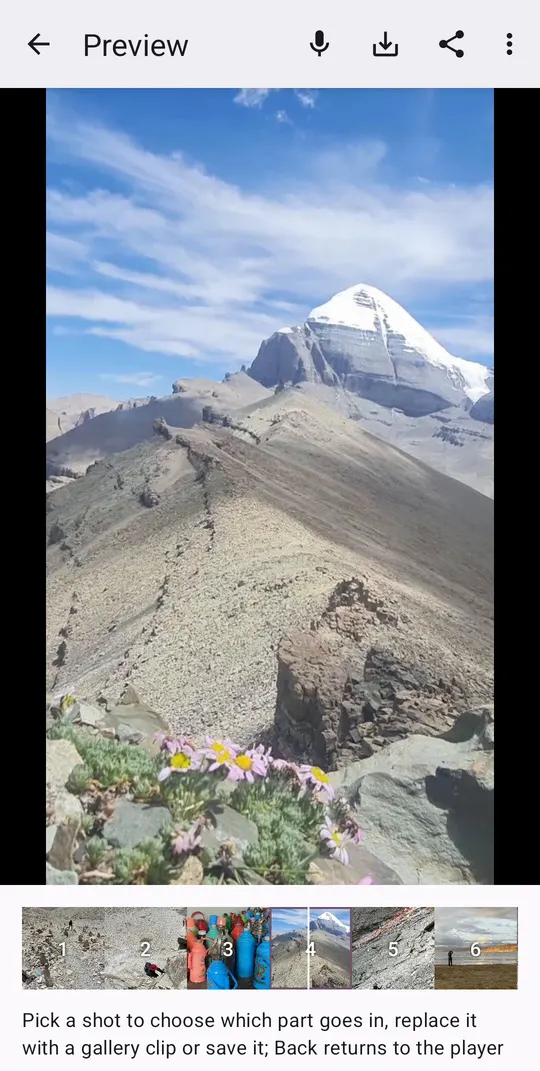
A hike to the summit in 16 shots, edited at the hut with no Wi-Fi.
On a plane
Film the trip, edit in flight mode, post when you land.
Metro, caves, basements
Underground there is no signal — and no problem.
Abroad without roaming
No data plan needed for the edit; only the final share uses the network.
Recipes for trails and the outdoors
Mountain trek
A day on a mountain trail to a wide, airy cinematic tune: the path ahead, hands on the stones, tea at the hut, the summit where the music hits, prayer flags in the wind, the lake, the snow peak far away, a waterfall and the way back down.
Horse trail day
A day out in the countryside on horseback or on foot to a bright acoustic adventure tune: horses at the start, hooves and boots, the group on the trail where the music hits, the view, lunch at the farmhouse and the sunset.
Bike ride
A bike ride through the city or the countryside to a laid-back guitar tune: the bike against a wall, the helmet strap, the first push, the open road ahead where the bass comes in, the wheel on the path and a rest by the water.
First snow
Nature to a gentle piano waltz in three: snow, a forest, a frozen river, breath in the cold air.
Before you go: a 5-minute checklist
- Install CamJam at home from Google Play, while you have Wi-Fi.
- Download 2–3 recipes Settings → Recipe catalog → tap a recipe → Download. Each is about half a megabyte; three come built in.
- Test in flight mode turn on flight mode, film three shots in your kitchen and press stop. If the video plays, it will work on the mountain too.
- On the trip film by the hints; the video is ready at the last shot. Share it to WhatsApp or Instagram when you have signal again.
What goes over the network — and what doesn't
Only two things, both optional: downloading recipes from the catalog and the update check. They contact getcamjam.com and send nothing but the app version. Your videos, sounds and projects never leave the phone; there is no account, no analytics and no advertising code. Details: privacy policy.
See also
Travel videos
Turn a trip into a 30-second travel Reel while you travel: a storyboard of 16 shots, hints for each, cuts on the beat. Free app for Android and iPhone.
Guide
A practical guide: plan 12–16 shots, film each a little longer, vary close-ups and wides, put the strongest shot where the music hits. With or without CamJam.
CamJam vs CapCut & Edits
Editors and templates work after the shoot with clips you already have. CamJam plans the shots before you film, edits during the shoot and works fully offline.
Questions and answers
Is there any feature that needs internet?
Only two optional ones: downloading recipes from the catalog and checking for app updates. Filming, track analysis, editing, saving and sharing to other apps on the phone work offline.
Does offline mode lower the quality?
No. The same encoder is used online and offline; 720p by default, 1080p in settings.
How much battery and storage does it use?
Filming uses the camera like any video app; each shot is processed right after it, in short bursts. Raw recordings of a 30-second video take roughly 100 MB — delete old projects in Settings → Projects. In the cold, keep the phone in an inner pocket between shots: batteries drain faster below zero.